# LYNC Account Abstraction SDK

LYNC AA SDK is a no-code Unity SDK supporting PC (MacOS and Windows) and Mobile (Android and iOS). LYNC Unity Account Abstraction SDK, your solution to seamless gamer onboarding in Web3 Games! Enable effortless logins via socials, wallets, email, and more. Integrate swiftly into any game on Mac, Windows, Android, iOS, or browser. Simplify the gaming experience with LYNC AA SDK, connecting gamers effortlessly.

### Get your API Key <a href="#get-your-api-key" id="get-your-api-key"></a>

Please get your API key before downloading the SDK from [**here**](https://www.lync.world/form.html)​

### Installation <a href="#installation" id="installation"></a>

Download the LYNC Account Abstraction SDK from [Here​](https://github.com/LYNC-WORLD/LYNC-Unity-AA/releases)

Example Project: <https://github.com/LYNC-WORLD/LYNC-Unity-AA/tree/main/Assets/LYNC-AA-SDK>

Import the SDK .unitypackage file to your project. or simply drag and drop .unitypackage file to your project.

<figure><img src="/files/gZFDLbANRvJ5eiSu2YC8" alt=""><figcaption><p>Assets -> Import Package -> Custom Package</p></figcaption></figure>

Once the Account Abstraction SDK package has finished importing into your Unity project, you can begin integrating it into your game.

The Folder structure looks like this

<figure><img src="/files/VtGGQl5gMruPfUjBGftC" alt="" width="282"><figcaption><p>SDK Folder Structure</p></figcaption></figure>

### Integrating AA SDK in Unity

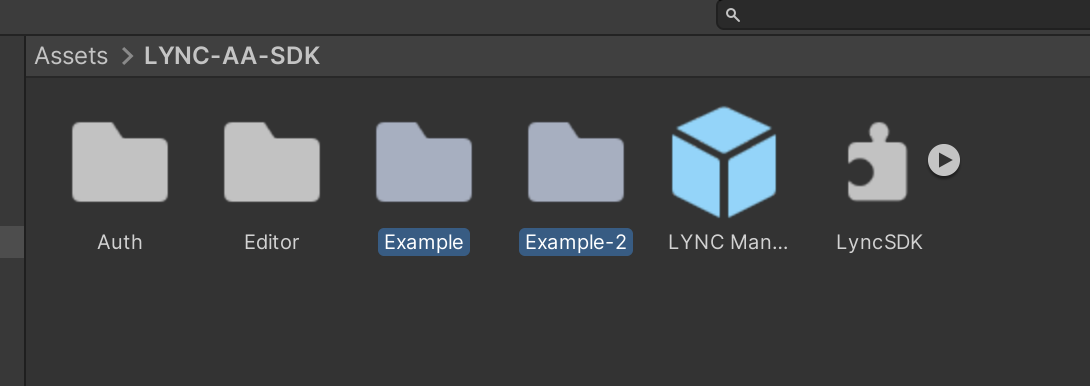
There are 3 Example Projects present in the SDK:&#x20;

Assets -> LYNC-AA-SDK -> Example / Example-2 / Example-3

<figure><img src="https://files.gitbook.com/v0/b/gitbook-x-prod.appspot.com/o/spaces%2F3h3YUWYt8sR5rHLOIeFc%2Fuploads%2FDxY6OEVTVzwMMSCRcile%2FScreenshot%202023-10-30%20at%201.20.22%E2%80%AFPM.png?alt=media&#x26;token=0df1470b-5598-4f2d-915c-1f25fcf0cd2a" alt=""><figcaption><p>Example Projects</p></figcaption></figure>

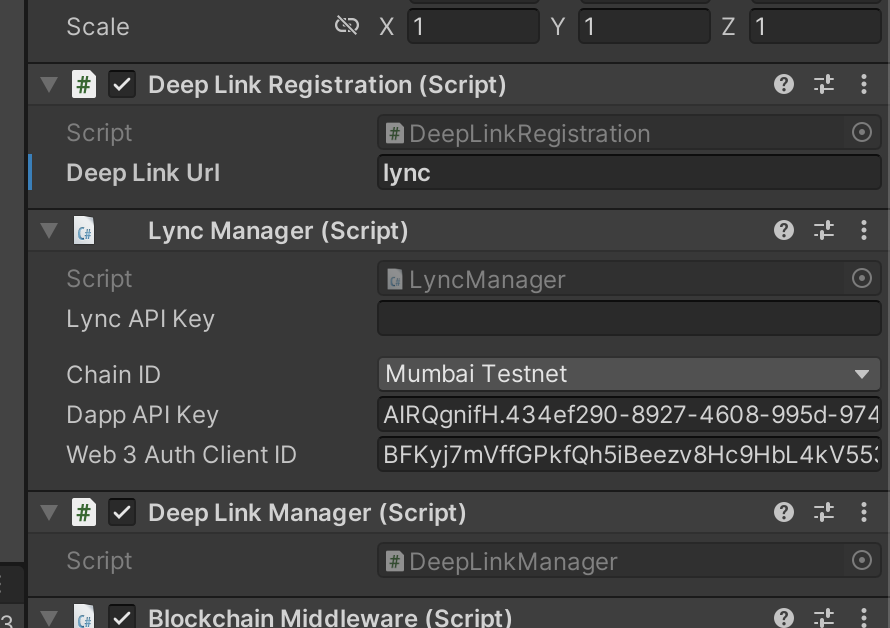
You can find the example scene in the folders. Simply pass the API key in lyncManager GameObject.

To test, Build and Run after adding this scene in (Scene in Build).

<figure><img src="https://files.gitbook.com/v0/b/gitbook-x-prod.appspot.com/o/spaces%2F3h3YUWYt8sR5rHLOIeFc%2Fuploads%2FJoAjijoyTGcJ7ZN7b7Jt%2FScreenshot%202023-10-30%20at%201.22.52%E2%80%AFPM.png?alt=media&#x26;token=84ced955-43e5-40de-b0bf-b535797193fd" alt="" width="375"><figcaption><p>Pass LYNC API Key​</p></figcaption></figure>

## **Setup the Project**

To use LYNC Account Abstraction. Attach LYNC Manager Prefab(Assets/LYNC-AA-SDK/LYNC Manager. prefab), on the starting scene.\
This will serve as the starting point for your project.

In LYNC Manager Prefab, be sure to provide the following details:

1. LYNC API Key ([The API Key can be generated from here](https://lync.world/form.html))
2. Choose chain
3. Choose Network (Testnet/ Mainnet)
4. Pass in the Dapp API Key ([The API key can be generated from the Biconomy Dashboard](https://dashboard.biconomy.io/) )
5. Web3 Auth Client ID ([The API key can be generated from the Web3 Auth Dashboard](https://dashboard.web3auth.io/login))
6. Pass a deep link name (example: lync/gameName etc.)

### Integrating Login or Transaction Layer via Account Abstraction in Unity

## Login Flow&#x20;

### No-Code Login Flow:

You can attach the Login Example Script in any scene where you want users to login, by dragging and dropping a Button as a Game Object.

<figure><img src="/files/AD269ubEH8biFzAVR1sr" alt="" width="563"><figcaption><p>Attach loginExample Script</p></figcaption></figure>

### Login Flow with Code:

Login and Transactions can be done once the LyncReady action is triggered.

<figure><img src="/files/1ejelFxugfwNdKksWTGs" alt="" width="563"><figcaption><p>Assets -> LYNC-AA-SDK -> Example-2 -> loginExample.cs</p></figcaption></figure>

The Sample Code for Login can be found at loginExample.cs, LoginTransactionExample.cs and ExampleLogin.cs

> **Make sure to Import LYNC.**

```csharp
using LYNC;
using LYNC.Wallet;
```

**Example (Event Trigger):**

LYNC ready Should be a function which has an argument of type "LyncManager"

```csharp
LyncManager.onLyncReady += LyncReady;

private void LyncReady(LyncManager Lync)
    {
        // Once LYNC is ready, you can do any steps like Login, Logout, Transactions etc.
        
        //To Login:
        Lync.WalletAuth.ConnectWallet((wallet) =>
        {
            addressTxt.text = "Wallet Address: " + wallet.publicAddress;
            loginDateTxt.text = "Login Date: " + wallet.loginDate.ToString();
            string smartAccountAddress = walletData.SmartAccount;
        });
        
        //To Logout:
        Lync.WalletAuth.Logout();
    }
```

**To Check if the user is logged in or not:**

```csharp
WalletData walletData = WalletData.TryLoadSavedWallet();
if (walletData.WalletConnected){
    // User is already logged in
}
else{
    // Ask user to login
}
```

**To get the User's wallet address, if the user is logged in**

```csharp
string EOAWalletAddress = walletData.PublicAddress
string SmartAccountAddress = walletData.SmartAccount
string EmailAddress=  walletData.Email;
string UserName = walletData.UserName;
string IdToken = walletData.IdToken;
```

**To Fetch from PlayerPrefs:**

```csharp
string publicAddress = PlayerPrefs.GetString("_publicAddress");
string smartAccount = PlayerPrefs.GetString("_smartAccount");
string email = PlayerPrefs.GetString("_email");
string userName = PlayerPrefs.GetString("_userName");
string idToken = PlayerPrefs.GetString("_idToken");
```

**To Login directly:**

```csharp
LyncManager.Instance.WalletAuth.ConnectWallet(loginUrl, (walletData) =>
{
    // Get all the user's wallet data from "walletData"
});
```

**To Logout directly:**

```csharp
LyncManager.Instance.WalletAuth.Logout();
```

## Transaction Flow&#x20;

There are two methods for proceeding with a transaction:

1. **Gasless Transaction -** Game Developer/ Game Studio will be sponsoring the transaction fee (Function Name: **SendTransaction**).
2. **User Paid Transaction-** The Gamer/ User will be responsible for paying the gas fee and cost if any, required to do the transaction (Function Name: **SendUserPaidTransaction**).

### Gasless Transaction

> The limitation with gasless transaction is that, you can't have a cost required in the smart contract.

To do transactions, TokenExample.cs and LoginTransactionExample.cs can be taken as a reference.

Pass in the Contract Address and Function Name Example: MintNFT(). MintNFT(unit256 id, unit256 amount)

Args are not compulsory parameters, but if the function accepts any argument, make sure to pass them.

<figure><img src="/files/i4pG23SX6Qg1vTNoipYJ" alt="" width="563"><figcaption><p>Token Transactions</p></figcaption></figure>

To do it from the script:

```csharp
LyncManager.Instance.blockchainMiddleware.SendTransaction(contractAddress, functionName, args, onSuccess,onError);
```

onSuccess: Once the transactions are completed, this handles what to do.

onError: If the transactions failed, this handles what to do.

### Setup Gasless Transactions with Biconomy

To enable gasless transactions via Biconomy, Register a new paymaster on the [Biconomy Dashboard](https://dashboard.biconomy.io/#). \
Make sure you select the version: 1.0.1

<figure><img src="/files/6ehYsgPcSctJuiopQnRu" alt="" width="482"><figcaption></figcaption></figure>

Once done, Get the API Key and Pass it to the [LYNC Manager](#setup-the-project).

<figure><img src="/files/uyS0EqL5tn7tQYbQJcGh" alt="" width="563"><figcaption><p>Biconomy API Key</p></figcaption></figure>

Setup the gas tank, in Policies create a new one and pass the contract address

<figure><img src="/files/KlRtcX1QjFnrQTdnjUwU" alt="" width="248"><figcaption><p>Contract Address setup</p></figcaption></figure>

That's it, now you can do the gasless transaction on this contract address passing in the LYNC AA SDK.

## **User Paid Transaction**

**This will require gamers/ users to have some funds in their wallet on the chain you are using. There are two ways, You can ask users to send some tokens to this smart account or use LYNC on-ramp/ off-ramp for gamers allowing them to add funds via credit/ debit card, Apple Pay, Google Pay etc.**

User Paid Transactions are similar to Gasless transactions to use, there is only one more parameter required to send is cost in ethers (ex. 0.1).

```csharp
LYNC.LyncManager.Instance.blockchainMiddleware.SendUserPaidTransaction(contractAddress, functionName, arguments,cost, On721TrxCompleted, onError);
```

You can see the **Assets/LYNC-AA-SDK/Example-2/TransactionExample.cs** example script as a reference.

### Some common bugs and their resolutions

**Problem:** Newtonsoft JSON is missing.

**Solution**: Please, Add this as a git URL in adding package

```csharp
com.unity.nuget.newtonsoft-json
```

<figure><img src="/files/qBOyx52c5aTmGMHLBgai" alt="" width="563"><figcaption></figcaption></figure>


---

# Agent Instructions: Querying This Documentation

If you need additional information that is not directly available in this page, you can query the documentation dynamically by asking a question.

Perform an HTTP GET request on the current page URL with the `ask` query parameter:

```
GET https://lync-1.gitbook.io/lync/products/lync-account-abstraction-sdk.md?ask=<question>
```

The question should be specific, self-contained, and written in natural language.
The response will contain a direct answer to the question and relevant excerpts and sources from the documentation.

Use this mechanism when the answer is not explicitly present in the current page, you need clarification or additional context, or you want to retrieve related documentation sections.